
Chasing updates by phone
- Planners ring drivers for positions all day
- The tracking tab shows the truck, not the job
- Customers phone the office for every ETA
- The picture is stale the moment it's read
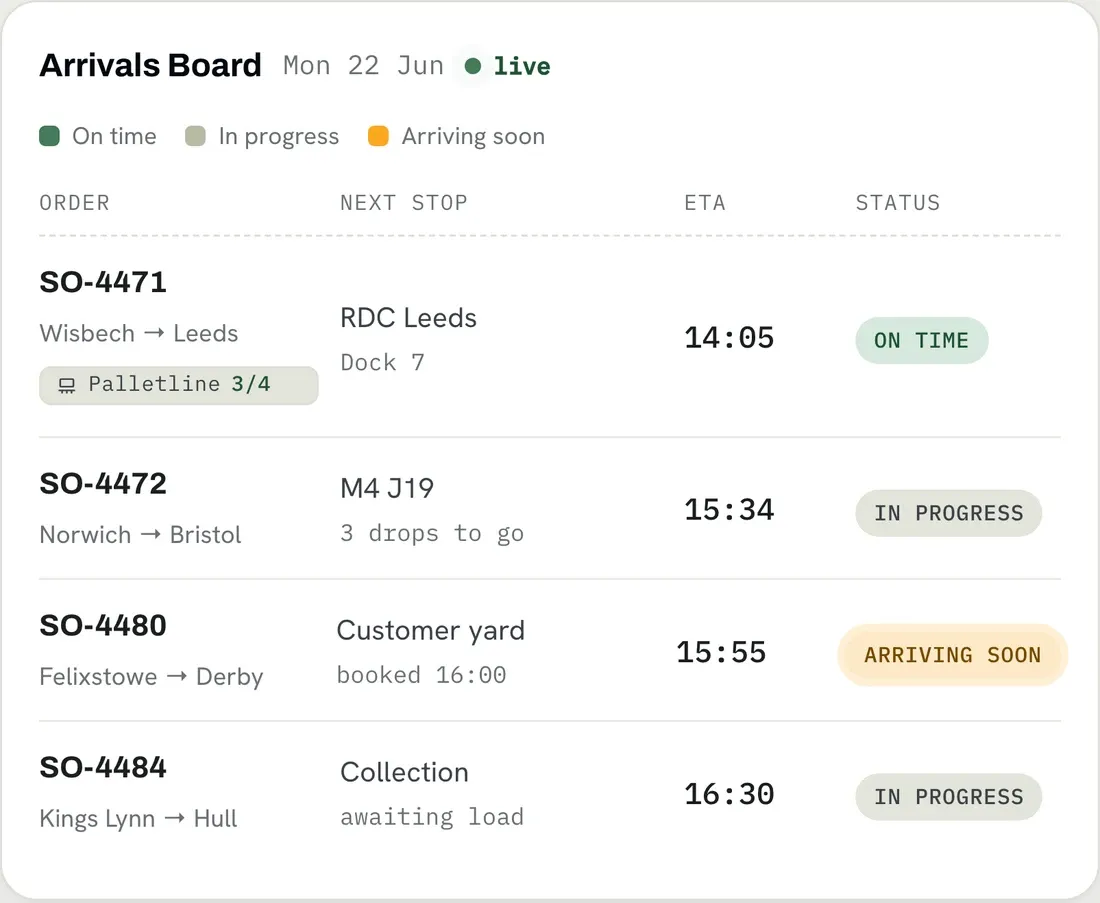
The Arrivals Board shows your traffic office where every job is and when it will land, re-timed at every check-in as your drivers work the day. The office stops ringing round for updates.
Trusted by UK haulage operators








A customer rings for an ETA. The planner rings the driver. The driver picks up if they can. By the time the answer comes back, the ETA has already moved, and your live picture of the day lives in three places at once: a tracking tab, the driver's phone, and someone's memory.
One screen the traffic office leaves open all day. Open any stage for the flow it follows, or the full list behind it.

Every stop across active and completed runs for today, in one scrollable table that re-reads itself every couple of minutes. Nobody has to remember to refresh it.

Drivers check in as they collect and deliver, and each check-in re-times what is left. Lateness is measured against the ETA where there is one, and against the clock where there is not.

Staff get the full board with links through to driver and vehicle records and the ability to comment. A customer role sees a trimmed board, scoped to their own organisation.

Filter to the clients, vehicles or runs that desk is responsible for, choose the columns worth the width, and the board remembers it.
Tickets came back to the office hours or days after the job, if they came back at all. Now the day reports itself as it happens, and the office can answer a customer without picking up the phone to a driver.
Drivers check in as they collect and deliver, and the system tracks their location in real time. Each check-in sharpens the ETA for the current stop and extrapolates ETAs for the stops further down the run, so the whole board stays current without anyone phoning round.
Your drivers do. They check in as they collect and deliver from the Driver App, and each check-in re-times the stops still to come. Call-ins are the authoritative signal, so the board works without every vehicle carrying a tracker. Where position data is available, the run also carries a route map of the estimated route against the actual one.
Yes, through a secure customer view. Each customer logs in to the Client Portal and sees an ETA arrivals board and dedicated tracking for their own orders only, never anyone else's work.
Yes. There are planner and key account manager views, extensive search, and dynamic notes that update live, so each person sees the slice of the operation they are responsible for.
We're building a link with Courier Exchange and Transport Exchange so exchange work can see its ETAs on the Arrivals Board. It's an active integration rather than a long-shipped, click-to-enable feature, so ask us where it's up to for your setup.
Bring a normal day's work and we'll show you the Arrivals Board running it, re-timing itself as the day moves.
Thank you
Your request has been received.