
Capture & Approve
Orders In, However They Arrive
Keyed by your team, raised in the portal, imported from a spreadsheet or posted by API. It all lands in one queue, so nobody retypes an email at half seven.
One transport management system, not a stack of tools that half-talk to each other. It plans the day, runs it in the truck, proves the delivery, prices it, bills it and reports on it, from the same live data. Search the full feature list below, or start with the part of the operation you are trying to fix.
Trusted by UK haulage operators








The same data, seen by the people who need it. Each part has its own page, and every feature inside them is listed further down.
Grouped by the point in the day they belong to. Search by what you call it, trunking, groupage, demurrage, claused POD, call-in, rather than by what we call it.
Keyed by your team, raised in the portal, imported from a spreadsheet or posted by API. It all lands in one queue, so nobody retypes an email at half seven.
Take the spreadsheet a customer has sent for nine years. Map the columns once, import it, then fix only the rows that failed.
New orders wait for sign-off before they can be planned, so nothing reaches a vehicle without a rate, or past a customer you have stopped serving.
Bundle orders so they plan and price as one movement, or split a big one across vehicles and days. Consolidation stops living in a planner’s head.
Pallets, containers, cars, bulk, liquid and dimensioned freight each carry their own fields, vehicle rules, call-ins and pricing measure.
Quay-to-door work carries its box, shipping line and free-time detail through to the invoice, so a container standing too long is a charge you can evidence.
Network consignments arrive with their depot detail intact and protected from being overwritten, and a leg subbed to the network can hand over automatically.
Each site is held once and properly geocoded, with its access notes and windows. What the first driver learned about the gate code, the next one is told.
Every pickup and drop carries its own window, contact and instructions, so a timed drop is planned as one rather than noted in a comment field.
An order arriving with an unknown address, or a feed that breaks, lands in a visible queue. You find out at nine, not when the customer rings at four.
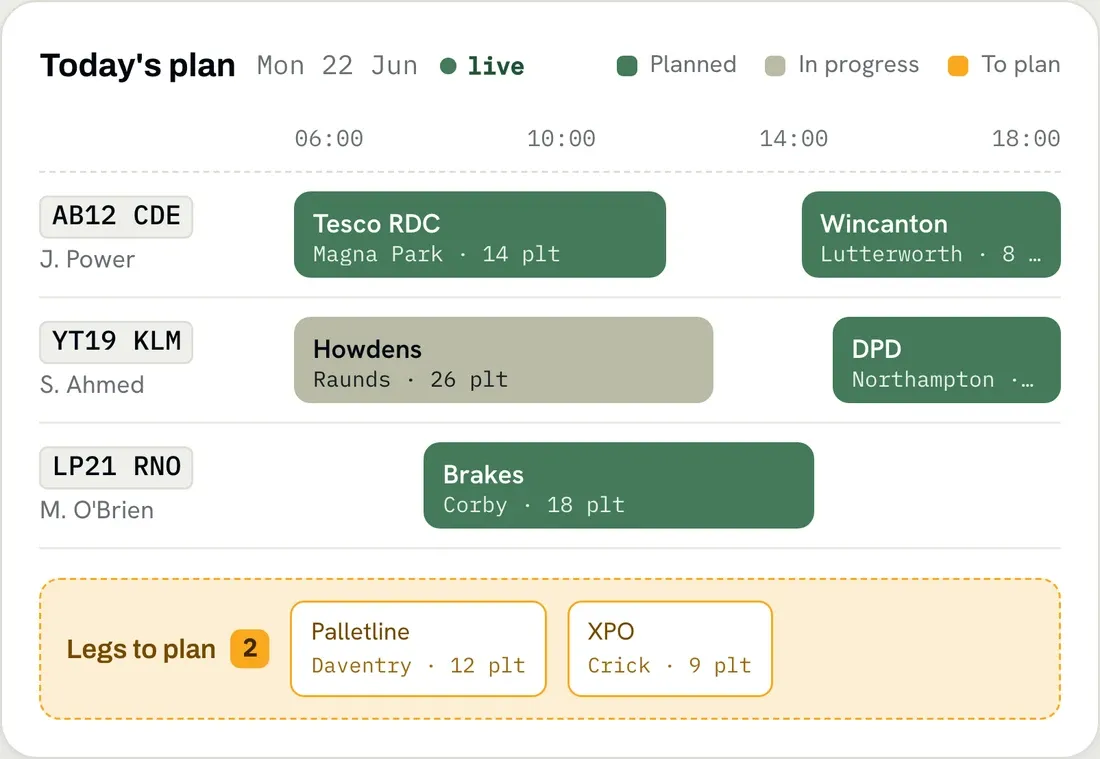
The day as one live grid of legs, with drivers, vehicles and trailers to drag onto the work. This is the screen that replaces the whiteboard.
Tour AI Planning opens on a worked-out set of tours, costed against booking windows, capacity, driver hours and the miles, naming any rule it had to bend.
Days down the side, vehicles across the top, revenue building per vehicle as you plan. You see which trucks are earning their week before it starts.
Tile the traffic sheet, leg planning and the map into your own saved layout, so a senior planner keeps their dense view and a new starter runs something simpler.
Plot the day geographically and the clusters show themselves, including the drop twenty miles from an empty truck. Return loads stop depending on who remembers.
Save a regular trunk as a template, hubs, timings and changeover included, then drop it onto a run. The night trunk stops being rebuilt every evening.
Every leg is its own record, so a breakdown touches that leg alone. One queue shows the legs still without a driver, well before five o’clock.
Contract work that runs the same way every day is created in bulk, leaving the planner free for the jobs that need a decision.
Commit the plan and the driver has their stops in sequence, with references, quantities and site instructions. Prints as a PDF where paper is still wanted.
Every stop today with its booked time, its live ETA and the gap between them, refreshing itself. A customer asking about a load gets an answer in seconds.
Every tracked vehicle on one map, fed by real-time driver tracking or the GPS units you already run. Replay any journey against the route you planned.
Drivers, vehicles and trailers across the week, with holidays, absence and maintenance on the same board. The uncovered Thursday shows up while you can fix it.
Licences and qualifications with their dates, cost rates, skills and history in one file. The expiring CPC or ADR ticket surfaces before it stops a job.
Class, dimensions, weight, capacity and cost rates per truck and trailer. Those dimensions are what keep a 4.5-metre trailer off a four-metre route.
ADR, HIAB, fridge, tail-lift. Skills sit on drivers, vehicles, trailers and the work, so the wrong pairing is caught before dispatch, not at the gate.
Subbed work is planned, tracked and rated on the same screen as your own fleet, with no licence for them to buy. The WhatsApp blackout ends.
Open a job to your subcontractors and they bid in their own login. They never see your customer’s rate, only the work and what they offered.
A trunk driver and an ADR driver do not need the same screens. Bundle the app settings into named profiles and point each driver at one.
Planners work their own drivers by default and see everyone else’s when covering, so a twelve-planner office stops fighting over one screen.
Stops in order, with addresses, references, quantities and site instructions. iOS and Android, their own phone or yours, no rugged terminals to buy.
Jobs, checks and ePOD capture all work with no bars, then sync when the signal returns. A concrete RDC bay stops being a hole in your data.
Verified walkaround checks before the wheels turn, with a photo required on any defect. Nil-defect declarations are recorded the same way.
A failed check reaches the workshop and the TM with its photos. Set it that way and the driver is held on that vehicle until the office clears it.
Arrival, departure and real quantities captured at the stop. A geofence calls in the driver who is heads-down working, so nothing shows as missing.
Scan labels and POD pages with the phone camera or a handheld scanner, so the right pallet on the right vehicle is evidence rather than an argument.
NavigateMagic, the optional add-on, routes for the height, width, length and weight on the job, and warns of low bridges early enough to act.
With NavigateMagic running, position is tracked all day, so empty running is counted. Put it on subcontractor trucks and check the miles they invoice.
Message one driver or twenty, with who sent it, who read it and when, all logged. An instruction disputed six weeks later can be produced.
A driver flags that they will be free in about twenty minutes, so the planner can line up the next load before the truck is empty.
A trailer dropped at a hub or a truck swapped after a breakdown is a guided step that brings its own check, and the office sees it without being told.
Fuel, tolls, parking and subsistence logged with the VAT and a photo of the receipt, so there is no bag of curled receipts on a Friday afternoon.
Attach a questionnaire to a site or a moment in the stop, with mandatory answers, required photos and a severity that can stop the driver.
Holiday and vehicle requests, and the delays and incidents of the day, raised as typed records the office can action. Not a text at eleven at night.
Work confirmed, expenses in, shift signed off, so the office knows the day is finished rather than merely quiet.
Signature, photos, quantity and notes, timestamped and geotagged at the drop and in the office within seconds. ‘It never arrived’ gets a photograph.
Proof is reviewed and approved before the invoice leans on it, so paperwork reaching a strict accounts payable is right the first time.
Every delivery whose proof has not come back, filtered by driver, subbie or customer, and actionable in the screen. Invoices stop waiting on paperwork.
The driver picks from your own list of clause reasons and it is stamped on the POD, so claims start from coded data rather than a re-read of free text.
A refusal or a closed site is an event in its own right, tracked to redelivery, return or goods held, with the chargeable outcome reaching the invoice.
What packaging went out, what came back and why it did not, counted at the stop. Pallet accounts stop drifting into a four-figure write-off.
Scan or drop paper PODs into a watched folder on a depot PC and they attach themselves to the right orders. Going digital does not wait for everyone else.
Contract pricing as a live matrix: pallet or weight bands, your own postcode zones, per order, run or mile. The rate the planner sees is the rate billed.
Rates are effective-dated, so an April uplift is entered in February and applies itself. Push an increase across many customers in one action.
Give it the base price, the current price and your fuel share, and the escalator works out its own percentage. The monthly spreadsheet disappears.
Waiting time, tail-lift, pallet exchange, an extra drop, a clean-air charge. Defined once, added as the day happens, and on the invoice rather than absorbed.
Free time per stop, waiting measured against it, and the chargeable minutes reported beside the booked and actual times. The evidence comes from the drop.
Buy rates run through the same engine as your sell rates, then the legs they ran are listed ready to pay. Margin per job stops being a month-end guess.
Delivered work is flagged as ready to bill, then the batch is laid out line by line for a final look. Nothing bills unchecked, nothing sits unbilled.
Automated invoicing pulls order, run and subbie lines into one document with fuel and VAT applied, emailed as a PDF. Days come out of your debtor days.
A disputed charge is reversed by an approved credit note applied against the invoice, so nobody rewrites an issued document and the ledger survives.
Payments posted against invoices, balances moving as they land, every transaction per customer in one ledger. The credit-control call starts with facts.
Invoices and credit notes post into Xero, Sage 50 or Sage 200 with your nominal and VAT codes mapped, so finance stops rekeying your sales ledger.
Rate a job in euros, report and post in sterling, on dated exchange rates. Irish and continental work bills without a manual conversion step.
Customers see their own loads, live ETAs, PODs and invoices, and raise bookings where you enable it. One of their people manages their own logins.
The POD pack goes out on approval and the invoice on issue, both on your template, so the ‘can you resend that POD?’ email stops arriving.
Order confirmed, POD approved, invoice issued. You set the template, the recipients and the conditions, by email or pre-approved WhatsApp.
Invoices, manifests and ePODs carry your logo, and the portal your colours and your domain. A twenty-truck operator looks like a two-hundred-truck one.
Revenue per customer against fuel, wages and operating cost, with the gross profit left over. The report you take into a rate review.
What each truck and driver earned, and what they cost. Keeping, replacing or parking a vehicle rests on that vehicle’s own numbers.
Loaded against empty miles and minutes, the empty share as a percentage and revenue per mile. The lanes you run on fresh air become a target list.
Delivered jobs with no invoice, and extras agreed but never charged. Leakage caught at a week old rather than found at year end.
Failed deliveries by run, with the code, the reason and where the fault sat. Emailed each morning, so your call comes before the customer’s.
What went out, to whom, at what buy rate and what it left behind. The hauliers to give more work to, and the ones not to.
Volume and value per customer over months and years, so the account quietly sending thirty per cent less work shows up before the renewal.
Jobs, shifts, runs and pallets per driver, with employed, agency and subcontractor drivers reported separately. Payroll queries start from one record.
The report, its filters and who receives it. Yesterday’s numbers are in the inbox before the first planner logs in, which is how a report gets read.
Sixty more covering operations, commercial, subcontracting, fleet, HR and audit, each filtered and exported to CSV. No BI project to fund first.
Write the check your fleet needs, then every submission is kept with its answers, photos and timestamps. Three months of records is a filter and an export.
Breaks taken on the road with their duration, times and a map pin. It records what happened; it does not replace your tachograph analysis.
Dated notes against a driver with the reason and who added it, so the third late start is a record rather than three managers half-remembering.
Who changed this tariff, when that POD was approved, why this invoice was reissued. Answered from the record, with controls on what can still change.
Roles decide the screens, controls and API endpoints a user reaches, enforced on the server. A planner does not see margin, a subbie never sees your rate.
Individual logins, password rules, optional MFA, and your operation in its own database. The answer your biggest customer’s security questionnaire wants.
Load offers arrive as orders, tenders are accepted without leaving HaulierMagic, and status flows back to the shipper. No dual-keying into their portal.
Orders, planning, resources, POD, invoicing and reporting, with access controlled per role and endpoint. Feed a customer’s portal without a second fleet list.
Sub-second search across orders, runs, customers, sites, invoices and PODs, forgiving of a half-remembered reference. The caller gets their answer on the call.
An assistant that works inside your data and can create or edit only the record types your roles allow. It answers questions about your operation.
Settings govern how planning, orders, documents and the app behave, and you can rename anything to your own words. Yard vocabulary stays as it is.
Each business in its own workspace with people working across them, and internal movements reported separately. Acquiring a fleet is not acquiring a system.
Nothing matches that. Try another word, or tell us what you need. If it runs in your traffic office, it is worth asking about.
See pricing for what each plan includes, or integrations for what HaulierMagic connects to.
HaulierMagic runs the whole haulage day on one set of live data: order capture, tour and route planning, resource and shift planning, the Driver App with ePOD and verified walkaround checks, HGV-safe in-truck navigation, a live Arrivals Board, the Client Portal for your customers and subcontractors, tariff-based rating and invoicing, and a report library of more than sixty standard reports. The full list is on this page, searchable.
Both. Tariffs hold your rate matrices per customer and per subcontractor, with effective-dated versions, fuel-surcharge policy, extras and service levels. Delivered work is checked, batched, invoiced and posted into Xero, Sage 50 or Sage 200, with credit notes and payments handled properly rather than by editing an issued invoice.
They are one application. A job planned on the board appears in the Driver App, its progress feeds the Arrivals Board and the client portal, the approved POD releases it for billing, and the invoice posts to your accounts package without anyone rekeying it.
No. Many operators start with planning and the Driver App, then bring the Client Portal and invoicing on as the team settles. Switching a part on is a configuration change rather than a new project.
More than sixty, across operations, commercial, subcontracting, fleet, HR, trend and audit: including customer and vehicle profitability, empty running, demurrage, uninvoiced work, non-compliance and outstanding PODs. Reports can be filtered, exported to CSV, and set to email out on a recurring schedule.
No. It works alongside them. The live map and Arrivals Board can be fed by your existing GPS units or by the Driver App, switchable per user, and invoices post out to Xero, Sage 50 or Sage 200, so you keep what works and stop the double entry.
Every operator runs in their own workspace with its own database, rather than as rows in a shared table. Orders, drivers, tariffs, invoices and PODs are physically separate. Sign-in uses individual accounts with optional multi-factor authentication, and every permission is enforced on the server.
Yes. A REST API covers nearly the whole product, orders, planning, resources, fleet, POD, invoicing, integrations and reporting, and access is controlled per role, per endpoint.
PodMagic handles that. Scan or drop the files into a watched folder on a depot PC and they upload automatically, get attached to the right orders, and appear alongside the ePODs captured on the road.
Last updated:
A 30-minute walkthrough built around your fleet, your routes and the way you already work.
Thank you
Your request has been received.