
Planning by hand
- One copy of the plan, on one wall
- Changes relayed by phone and text
- Legs slip through the cracks
- No live view of where work stands
- The revenue is somebody else's spreadsheet
HaulierMagic is the transport management system that turns your incoming orders into a clear plan your drivers can act on. Drag legs onto vehicles, sequence the stops, and send the job straight to the driver's app.
Trusted by UK haulage operators








When the plan lives on a wall or in a spreadsheet, only one person can see it, every change means a phone call, and a missed leg is a missed invoice. HaulierMagic puts the whole day on one board your whole team can work from.
Each stage is a screen your planners already recognise. Open any stage for the flow it follows, or the full feature list behind it.

A week-at-a-glance grid: one column per vehicle, one row per day. Drop a leg onto a vehicle and the plan updates for everyone in near real time, unplanned legs wait in one queue until they are covered, and the running revenue on each column re-adds itself as you go.

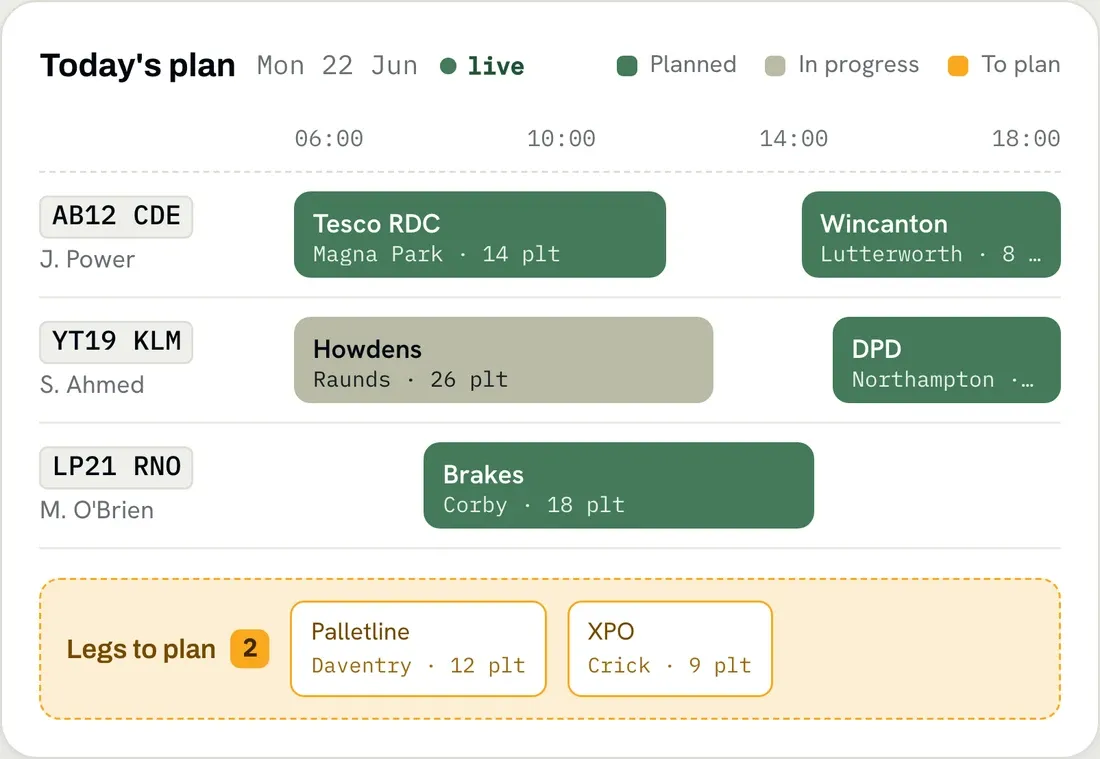
A timeline board where each row is a resource and the horizontal axis is time. Collection, trunk and delivery sit in one picture, so a job that changes hands twice is still one job, and you can add a trunk before, between or after any leg without rebuilding the run.

Skills sit on every resource, so ADR work goes to an ADR driver and cold chain goes on a fridge unit. Conflicts are blocked at save rather than flagged afterwards, and absences, holidays and vehicle inspections take a resource off the table before it can be planned.
Send a pool of orders and the routing engine returns costed tours on a map. Orders it cannot place surface on their own tab rather than disappearing, loaded and repositioning legs are coloured differently so dead mileage is visible, and nothing reaches a driver until you create the runs and communicate them.
Invoices and credit notes post straight across, so a planned job becomes a billed job without anyone rekeying it.








A Cumbrian haulier, seventeen vehicles, measured over five months against the same period the year before. No extra trucks. No extra planners. The day just stopped being planned on a wall.
A Cumbrian quarry and haulage group ran 17 trucks on a whiteboard, texts and paper tickets. HaulierMagic replaced all three with one system. Eighteen months on, the fleet is the same size and the business is not.
Drag-and-drop is intuitive for anyone who's used a screen, so planners are generally confident within hours rather than weeks. We provide live onboarding and a knowledge base.
Yes, and this is the default posture of the system rather than a concession. Optimisation produces draft tours; nothing touches a live run until you create it, and no run reaches a driver until you communicate it. Plan entirely by hand, accept the proposed tours, or anything in between.
Communicated work is locked until you un-communicate it, which prevents a driver silently receiving a different job mid-run. Once un-communicated you can re-sequence stops, add a trunk or destination, or change the driver, vehicle or trailer for the remaining legs, then recalculate ETAs and re-communicate. The app picks the change up at the next sync. Completed legs and called-in stops stay frozen.
Subcontractors are tracked alongside your own fleet on the same screens, costed on their own tariff so subcontract margin is reportable separately. They can bid for work you open up through the client portal, and your rates stay hidden from them. They don't need their own HaulierMagic licence, though a subcontractor's driver needs provisioning as a driver on your tenant to use the mobile app.
Yes. Sage 50 through the Adept connector, Sage 200 over an OAuth-secured API, and Xero including customer contacts. Invoices and credit notes post across without rekeying.
GraphHopper by default, which handles distances, ETAs, mileage and tour building. NextBillion is available as an alternative engine where a tenant needs its additional tuning controls.
Book a demo and we'll plan a real day from your operation in HaulierMagic, so you can see exactly how it would work for your fleet.
Thank you
Your request has been received.